
A showroom on a laptop, for machines too big to bring to the fair.
A desktop application for Windows and macOS that Mikron's people run at trade fairs to walk a client through the machine range. Built cross-platform on a single budget, together with favon.io.
Context
Who they are.
Mikron is a Swiss manufacturer of precision automation systems, machining systems and cutting tools, supplying the pharmaceutical, medtech, consumer goods, automotive and general engineering industries. Their machines are large, expensive and highly configurable, which makes a trade fair stand an awkward place to show what they can actually do: you can bring one machine, maybe, out of a range built from dozens of combinations.
The problem
What they walked in with.
Mikron needed one piece of software that would run on whatever laptop was on the stand, Windows or Mac, and it had to be built within a fixed budget. Two native applications, built and then maintained separately, was never going to fit.
Our approach
How we worked.
One codebase, both platforms
Electron, chosen deliberately: a single codebase builds for Windows and macOS, so supporting the second platform cost close to nothing instead of doubling the work.
Built around the range, not the page
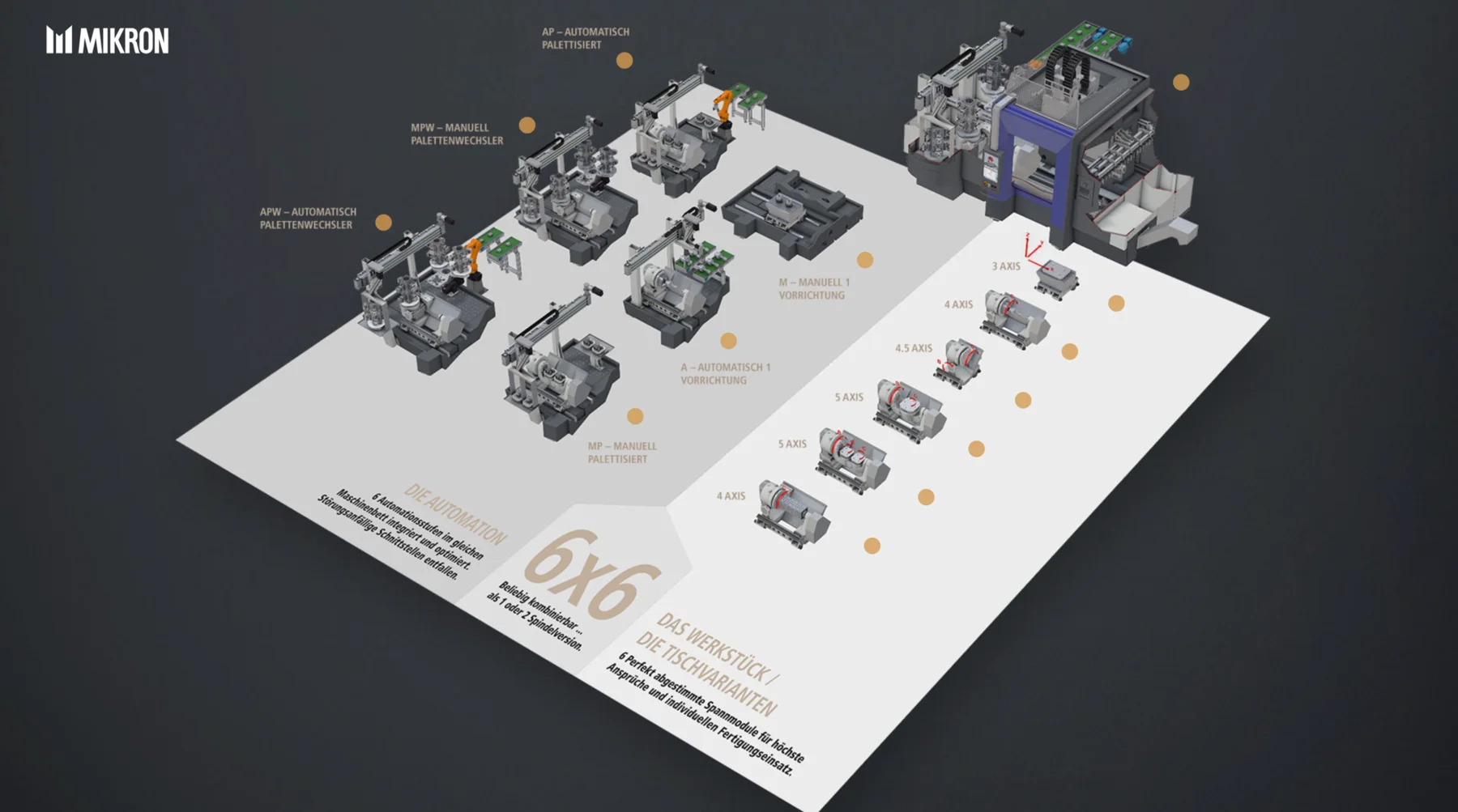
The application is organised the way the product actually is: automation stages on one axis, table and workpiece variants on the other, so a salesperson can move to the combination a client is asking about instead of scrolling past it.
Made for a noisy hall
It runs locally on the machine on the stand. No conference wifi in the critical path, no waiting on a page load in front of a customer.
Small team, with favon.io
Two people on the build, working alongside favon.io. Keeping the team small was part of how the budget held.
Highlights
The interesting parts.
- One Electron codebase covers both Windows and macOS, so the second platform barely moved the budget.
- The full machining range, six automation stages against six table variants, is navigable visually, so a configuration can be shown rather than described.
- Runs offline on the laptop on the stand, independent of conference wifi.
Stack
What we built it on.
Timeline
How it unfolded.
Scope
What the app needs to do on a stand, and the platform decision that keeps it inside budget.
Build
The Electron application, targeting Windows and macOS from one codebase.
Content
The machine range brought in: automation stages, table and workpiece variants, and the visuals for each.
Fair
Packaged for both platforms and handed over in time for the stand.
More case studies
Habitects AG
Owning the tech side of a bathroom-renovation platform, all the way through a merger.
Part-time CTO for Habitects AG: keeping their B2B bathroom shop running while conceiving, staffing and shipping the configurator that turns a filled-in form into a rendered bathroom, then handing the whole thing over cleanly when the company merged.
ReadArthouse Kinos
A new website and ticket shop for Zürich's most iconic cinemas.
Concept, project lead and engineering for a new Arthouse website and online ticket shop, replacing an ageing WordPress site. The design was outsourced to Unstated International, and the ticketing integration was built against an API that had no usable documentation.
Read